Analytics & Insights Add-on

SmartSearchWP
Analytics Dashboard

Addon included in Premium version.
(Premium version: €49.99/year)

See how your chatbot is being used in 30 seconds with SmartSearchWP

Want to measure your chatbot’s impact without having to read through every conversation? With the Analytics & Insights add-on, view a clear dashboard powered by your conversation history—without replacing the plugin’s PDF report.

Why use the Analytics & Insights add-on?

With this tool, you can:

  • 🔒 Key metrics: Conversations, messages, active days, and non-response rate—all at a glance.
  • 📊 Trend Charts: View daily activity over 7 days, 30 days, or a period of your choice.
  • 🎯 Popular Pages and Questions: Identify the most-viewed pages via chat and the top questions asked by your visitors.
  • 📱 CSV Export: Download a summary as a CSV file without having to go through the logs one by one.
  • 🧩 Email Summary: Get a short weekly email with the highlights—in addition to the automated PDF report.

Main features

  • Reliable data: The figures are derived from your recorded conversations and calculated automatically.
  • Automatic update: The dashboard refreshes as soon as a new conversation is recorded.
  • Flexible time periods: Analyze the last 7 or 30 days, or choose your own dates.
  • Simple Interface: An Analytics Menu in WordPress: Dashboard and Settings with a Single Click.
  • Supplement to the PDF report: The plugin can already generate a detailed PDF report; this add-on provides a faster overview.
  • Premium add-on: Included with the SmartSearchWP Premium subscription.
  • Easy installation: Compatible with the latest version of SmartSearchWP.

How do I get the extension?

The Analytics & Insights add-on is a premium extension of the SmartSearchWP plugin.
You can activate it directly from the Add-ons tab of the SmartSearchWP plugin in your WordPress dashboard.

Access to the extension ?

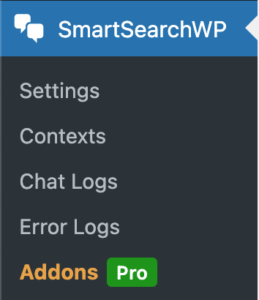
Once the extension is activated, a new ” Analytics & Insights ” tab appears in the SmartSearchWP menu, accessible from the admin interface.
View your metrics, charts, and rankings; enable the weekly email if needed.

SmartSearchWP
Analytics Dashboard

Addon included in Premium version.
(Premium version: €49.99/year)

User guide

It’s very simple… just follow the guide 😉

Buy or activate the extension

Go to the Add-ons tab and enable Analytics & Insights.

Addon configuration

  • Go to the WordPress admin panel >: SmartSearchWP > Add-ons > Analytics & Insights.
  • Activate the add-on, then go to the new “Analytics & Insights” tab in the plugin menu.
  • Select the analysis period (7 days, 30 days, or custom dates).
  • Save your changes. Export a summary to CSV or enable the optional weekly email.

Application examples

1. Editorial Management & SEO

Identify recurring topics to guide your content and SEO efforts.

2. Support & FAQ

Identify the most frequently viewed pages via chat to enhance your FAQ.

3. E-commerce & Product Content

Track the progress of conversations on your product pages.

4. Streamlined Reporting Without PDFs

View your metrics without opening the plugin’s long PDF report.

SmartSearchWP
Analytics Dashboard

Addon included in Premium version.
(Premium version: €49.99/year)

Hello, may I help you?
SmartSearch
Chatbot Image Hello, I am SmartSearchWP, how can I help you?

Powered by artificial intelligence, the bot can make mistakes. Consider checking important information.